
Planning to migrate to Slack? The biggest challenge is not moving messages; it’s preserving conversation history, files, channels, permissions, and workflow continuity without disrupting your teams. A successful Migration to Slack requires the right strategy, secure migration tools, and proper planning to ensure every conversation and file is transferred accurately.
Whether you’re transitioning from Microsoft Teams, Google Chat, or another collaboration platform, this complete Migrate to Slack guide explains the exact checklist, migration tools, and best practices organizations should follow for a successful Slack migration in 2026.
This guide covers the complete Slack migration process and the right tools to help teams move to Slack securely and efficiently.
Why Are Businesses Migrating to Slack?
Modern workplaces need communication systems that connect conversations directly with workflows, automation, and business applications. Traditional messaging platforms often create fragmented collaboration experiences where teams constantly switch between tools to complete tasks.
Slack has become one of the most preferred collaboration platforms because it centralizes communication while integrating with CRM systems, project management software, automation platforms, and AI-powered workflows.
Businesses moving to Slack often seek:
- Better workflow automation – Slack helps businesses automate repetitive tasks, approvals, notifications, and internal processes through advanced workflow automation and AI-powered collaboration features.
- Stronger third-party integrations – Slack integrates seamlessly with CRM platforms, project management tools, cloud storage systems, and productivity apps, helping teams centralize work in one platform.
- Improved communication organization – With channels, threads, and structured conversations, Slack keeps communication organized, searchable, and easy to manage across departments and projects.
- Enhanced remote collaboration – Slack enables real-time communication, file sharing, and instant collaboration, making it easier for remote and hybrid teams to stay connected and productive.
- Scalable productivity systems – As businesses grow, Slack supports scalable collaboration workflows, enterprise integrations, and automation systems that improve operational efficiency across teams.
This growing demand has also increased searches for terms like Teams migration to Slack tool, migrate to Slack, and Slack migration solutions.
What Should Be Included in a Slack Migration?
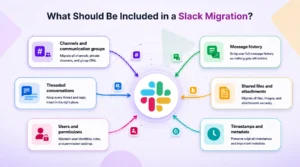
Before starting migration, businesses need to understand what data should move into Slack. A complete migration includes much more than chat conversations alone.
Organizations should preserve:
- Channels and communication groups
- Message history
- Threaded conversations
- Shared files and attachments
- Users and permissions
- Timestamps and metadata
Without preserving these elements correctly, businesses risk losing operational knowledge and disrupting team collaboration after migration.
A structured migration strategy ensures teams can continue working inside Slack without losing communication context or workflow continuity.
Slack Migration Checklist Before You Start
Planning is one of the most important stages of any successful migration project. Organizations that skip preparation often face issues like incomplete data transfer, broken permissions, and migration downtime.
Before migrating, businesses should evaluate their current communication environment carefully.
Audit Existing Communication Data
Start by reviewing existing channels, users, files, and message history. Identify inactive channels, duplicate files, and outdated conversations that no longer need migration.
This reduces unnecessary data transfer while ensuring critical communication records are preserved.
Define Migration Goals
Businesses should clearly define why they are migrating to Slack. Some organizations prioritize workflow automation, while others focus on collaboration scalability or integration flexibility.
Defining goals early helps teams structure the Slack workspace more effectively after migration.
Review Compliance & Security Requirements
Many businesses operate under strict compliance regulations related to data retention and security.
Before migration, organizations should determine which conversations need retention, how sensitive files will be transferred securely, what access permissions are required, and which audit and governance policies must be maintained.
This ensures the migration process remains secure and compliant throughout the transition.
How to Choose the Right MS Teams Migration to Slack Tool?
One of the biggest migration mistakes businesses make is relying on manual exports and imports. Manual migration often results in lost messages, broken threads, incorrect user mapping, and missing files.
A dedicated MS Teams migration to Slack tool automates the migration process while preserving communication structure and context.
- Automated message migration – The migration tool should automatically transfer chat history and conversations to Slack while preserving message structure and communication continuity.
- File and attachment transfer – A reliable Slack migration solution securely moves shared files, documents, and attachments without losing important business data.
- User mapping – Proper user mapping ensures conversations, permissions, and ownership remain aligned with the correct team members after migration.
- Channel structure preservation – The tool should maintain channel hierarchy and organization so teams can continue collaborating inside Slack without disruption.
- Timestamp retention – Preserving original timestamps helps businesses maintain accurate conversation history for compliance, audits, and operational tracking.
- Real-time migration tracking – Real-time migration monitoring allows organizations to track progress, identify issues quickly, and ensure a smooth Migration to Slack process.
Automation significantly reduces downtime and minimizes migration risks for growing organizations.
Best Practices for Migration to Slack
A successful Migration to Slack depends on how well businesses execute the migration process. Following best practices helps organizations reduce operational disruption while improving adoption after migration.
1. Start with a Pilot Migration
Before migrating the entire organization, businesses should test migration with a smaller department or workspace first.
Pilot migrations help identify:
- Data mapping issues
- Permission conflicts
- Missing files
- Workflow inconsistencies
This allows teams to resolve problems before full-scale migration begins.
2. Preserve Threads and Conversation Context
One of the most overlooked aspects of migration is conversation structure.
Messages without thread continuity lose important context, making collaboration difficult after migration. Businesses should ensure threaded conversations, timestamps, and message relationships remain intact throughout the transfer process.
This is critical for operational continuity and long-term searchability inside Slack.
3. Map Users and Channels Correctly
Incorrect user mapping can create confusion across departments after migration.
Businesses should validate:
- User identities
- Channel ownership
- Permission structures
- Group access levels
Proper mapping ensures employees can continue collaborating immediately after migration without workflow disruption.
4. Minimize Downtime During Migration
Communication downtime can significantly impact productivity, especially for remote and global teams.
Automated migration tools help reduce downtime by securely transferring data in phases while maintaining operational continuity.
Organizations should also communicate migration timelines clearly to employees before the transition begins.
5. Train Teams After Migration
Migration success does not end after data transfer.
Businesses should provide onboarding resources to help teams understand:
- Slack channels
- Workflow automation
- Integrations
- Collaboration best practices
This improves adoption rates and helps organizations maximize the value of Slack more quickly.
Common Challenges Businesses Face During Slack Migration
Even with preparation, migration projects can become complex without the right tools and processes.
The most common migration issues include:
- Missing Files and Attachments – Improper exports may cause files to disconnect from conversations, resulting in lost project context and incomplete communication history.
- Broken Conversation Threads – If thread structures are not preserved correctly, teams may struggle to follow historical discussions after migration.
- Incorrect Permission Mapping – Users may lose access to channels or files if permissions are not aligned properly during migration.
- Extended Migration Timelines – Manual migration methods often increase downtime and slow operational continuity.
These challenges highlight why businesses increasingly rely on automated Slack migration platforms.
How Move to Slack Simplifies the Migration Process
Move to Slack helps organizations securely migrate communication data while preserving structure, context, and collaboration continuity.
The platform automates:
- Message migration – Securely transfers complete chat history and conversations into Slack without losing communication context.
- File transfers – Moves files and attachments to Slack while preserving accessibility and organization.
- User mapping – Aligns users accurately to maintain permissions, ownership, and collaboration continuity.
- Channel migration – Preserves channel structure and hierarchy for seamless team communication in Slack.
- Thread preservation – Maintains threaded conversations to keep discussions organized and easy to follow after migration.
- Real-time migration tracking – Provides live migration progress updates for better visibility and operational control.
Unlike manual processes, Move to Slack ensures conversations, timestamps, attachments, and organizational hierarchy remain intact throughout the migration process.
This allows businesses to transition from Microsoft Teams, Google Chat, or other platforms into Slack with minimal disruption.
Conclusion
A successful solution for Migration to Slack requires more than moving messages from one platform to another. Businesses must preserve communication history, files, workflows, and collaboration context while minimizing operational disruption.
With the right migration checklist, automated tools, and best practices, organizations can transition to Slack securely and efficiently.
Move to Slack helps businesses simplify the entire migration journey by automating chat history transfer, preserving conversation structure, and ensuring teams can continue collaborating without losing valuable communication data.
Frequently Asked Questions
The best approach is using an automated Slack migration tool like Move To Slack that preserves messages, files, users, and channels securely.
Yes, businesses can perform Microsoft Teams to Slack migration while preserving chat history, files, and permissions with Move To Slack.
Slack migration helps organizations improve collaboration, automation, integrations, and workflow efficiency.
Organizations should audit communication data, review permissions, validate compliance requirements, and define migration goals.
Migration timelines vary depending on data volume, number of users, files, and migration complexity.